

Key Takeaways
Coupon Extension Auto-Apply
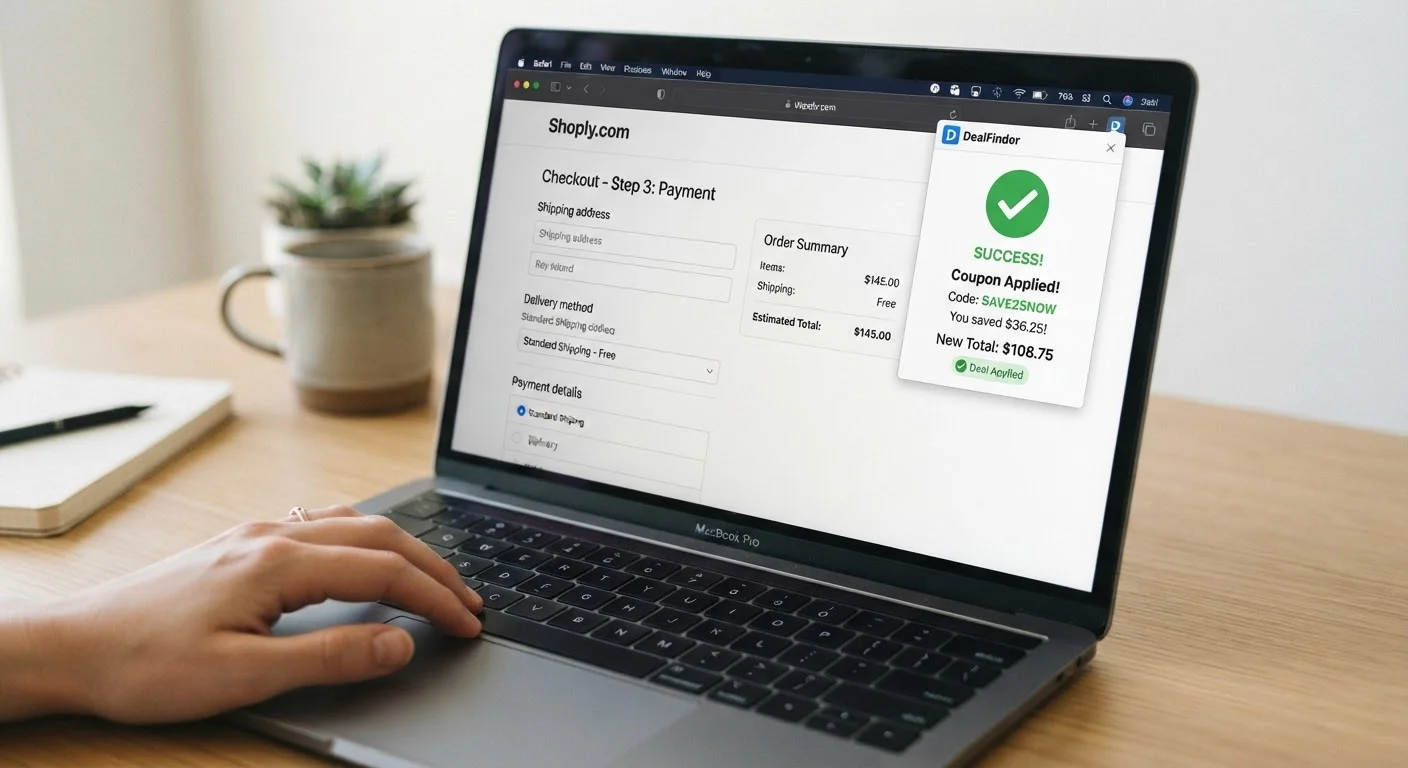
When a browser extension like Honey or Capital One Shopping automatically tests and applies discount codes at checkout, it's running a scripted process that queries a database of stored codes, injects them into the retailer's coupon field, and measures the resulting price change - all without you typing anything. The extension selects the code that produces the largest discount and leaves it applied. If no valid code is found, it exits silently.
Extensions use DOM manipulation and JavaScript injection to interact with checkout form fields. They typically operate as content scripts with access to the active tab's page structure, which is why they require broad site permissions during installation.
The Moment You Hit Checkout: What Triggers the Extension
The process starts before you even see the discount popup. Most coupon extensions run a persistent content script that monitors your active browser tab for URL patterns and page elements that signal a checkout environment. Triggers vary by extension, but they typically look for:
- URLs containing strings like
/checkout,/cart, or/order - DOM elements such as a coupon input field, an order summary table, or a "Place Order" button
- The merchant's domain matching a retailer in the extension's database
When those conditions are met, the extension wakes up and contacts its backend server to retrieve a list of active coupon codes for that specific retailer. This lookup is live - it's not pulling from a file sitting on your computer. The server returns a ranked list of codes, usually sorted by reported success rate or discount value based on aggregate data from other users' sessions.
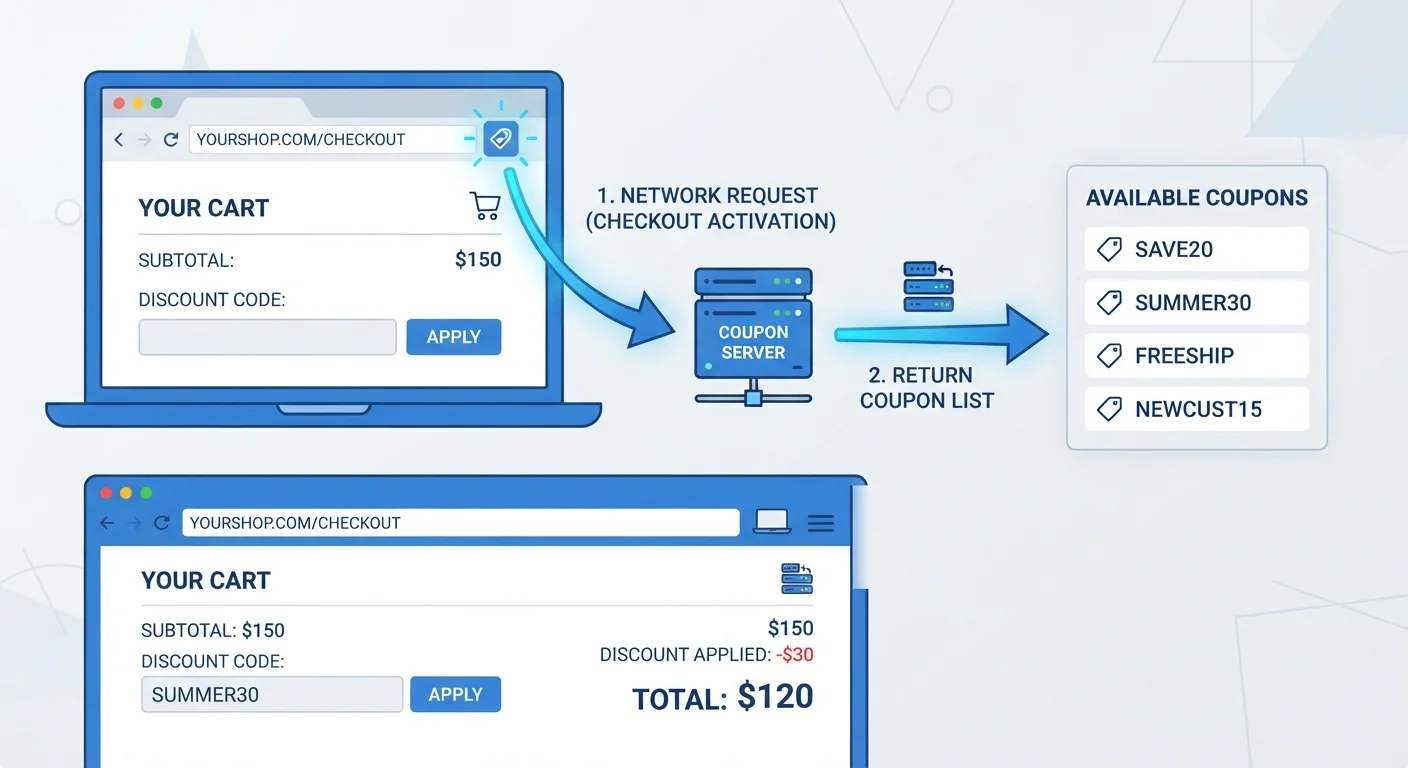
This is why the popup appears a second or two after the page loads rather than instantly. There's a real network request happening. The extension is asking its servers: "What codes do we have for this merchant right now, and which ones are working?"
Not All Retailers Are in the Database
Extensions maintain active retailer lists, and a merchant must be recognized for the extension to trigger. Smaller or newer retailers may not appear in an extension's database at all, meaning the popup never activates even if the merchant offers valid coupon codes. If you're shopping somewhere niche, plan to source codes manually.
Auto-Apply Requires an Active Internet Connection
The code retrieval step is a live server call - the extension isn't working from a local cache. If your connection drops or the extension's backend is slow, the popup may stall or return no codes even when valid ones exist. This is rare but worth knowing if you're troubleshooting a failed activation.
The Code-Testing Loop: How Auto-Apply Actually Works
Once the extension has its list of codes, it begins the testing sequence. Here's the mechanical reality of what happens:
- The extension locates the coupon input field using DOM selectors. It identifies the text box by its
id,name, orclassattribute - whichever reliably matches that retailer's checkout structure. - It injects the first code by programmatically setting the field's value and triggering the necessary JavaScript events (keydown, input, change) to mimic a real user typing.
- It clicks the "Apply" button - again, programmatically - and waits for the page to respond.
- It reads the new order total from the DOM and compares it to the baseline total recorded before testing began.
- If the price dropped, the code is flagged as a candidate. The extension records the savings amount and moves to the next code.
- The loop repeats until all codes are tested or a time limit is reached.
- The best-performing code is left in the field, and the extension displays the savings amount in its popup.
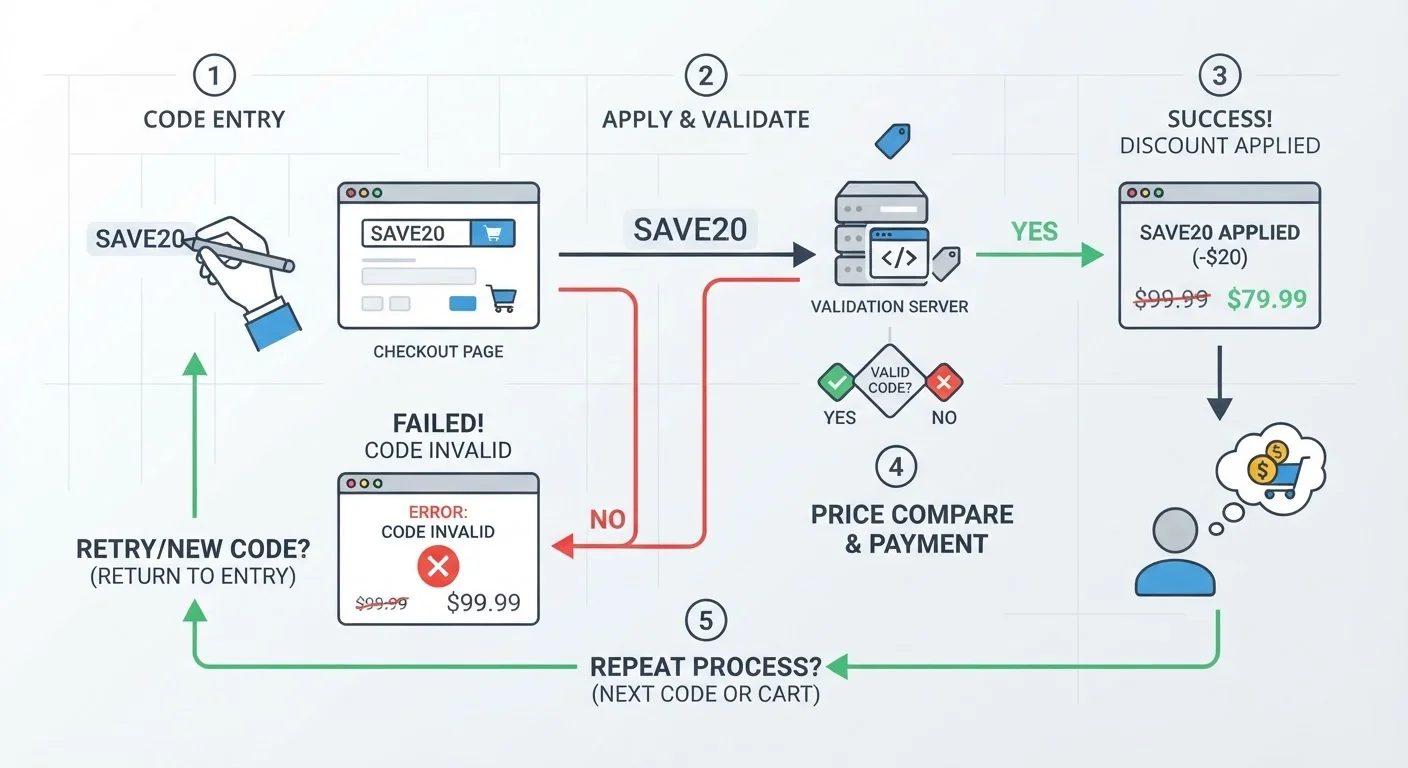
The entire loop usually takes 10-30 seconds depending on how many codes are being tested and how quickly the retailer's server responds to each apply-and-refresh cycle. Retailers with complex checkout systems - particularly those that require a full page reload to reflect a discount - slow the process down considerably.
Pause Before Clicking 'Place Order'
Once the extension applies a code, take five seconds to confirm the discount actually appears in your order summary - not just in the extension's popup. Some extensions display a savings amount based on the code's stated value rather than what actually changed on the page. The order summary is ground truth.
Disable Extensions When Using Affiliate Cashback
If you're activating cashback through a portal like Rakuten or TopCashback, consider disabling coupon extensions for that session. Some retailers' affiliate terms invalidate cashback when a competing extension assisted the session. The cashback is often worth more than any single coupon code, especially on big-ticket purchases.
One important nuance: the extension measures savings as the difference in displayed total, not the stated discount percentage. A code advertised as "20% off" that applies only to select items might produce less actual savings than a flat "$5 off orders over $25" code. The extension picks whichever moves the number down the most, which is generally the right call - but it means the "winning" code isn't always the one with the biggest headline number.
Where the Codes Come From (and Why That Matters)
Understanding the source of these codes explains why auto-apply sometimes comes up empty, and why the savings can feel inconsistent.
26M+
Honey browser extension active users
Reported by PayPal following its acquisition of Honey, reflecting the scale of community-sourced code data the extension draws from.
~30 sec
Average auto-apply testing time per checkout
Based on observed extension behavior across major retailers; time increases with the number of codes tested and checkout system complexity.
61%
Shoppers who don't verify savings after auto-apply
According to a 2023 consumer survey by RetailMeNot, most shoppers assume the extension found the best deal without independently checking the final total.
~10-20%
Code success rate in typical extension databases
Industry estimates suggest the majority of stored coupon codes are expired or restricted at any given time, meaning most tested codes fail before a winner is found.
Community sourcing: Honey, the most well-known extension, built its initial database primarily through user submissions. When a shopper finds a working code - from an email, a forum, a loyalty program - they can submit it, and Honey validates and stores it. This crowdsourcing model produces a broad but uneven database. High-traffic retailers like Amazon, Walmart, and Target have hundreds of submitted codes; niche retailers might have three.
Affiliate partnerships: Extensions also have direct relationships with retailers. Merchants supply codes to extension providers as part of affiliate marketing agreements. These codes are reliable but may be less aggressive than the best publicly available deal. The extension earns a commission when you complete a purchase after it assists - which creates an incentive to surface codes that close sales rather than maximize your discount.
Web scraping: Some extensions crawl coupon aggregator sites and retailer promotional pages automatically. These codes may be outdated or have restrictions that aren't flagged in the database (minimum purchase, specific categories, one-time use).
The practical consequence: the extension's database is a snapshot of what's been found and reported, not a comprehensive index of every discount that exists. Exclusive codes from brand newsletters, credit card portals, or loyalty tiers will rarely appear. For a deeper look at why this gap matters, see why coupon app savings never reach your cart.
“Coupon extensions are essentially running a real-time auction of discount codes on your behalf - but the auction is only as good as the inventory they have access to. If the best deal isn't in their database, they can't surface it.”
— Julie Ramhold, Consumer Analyst, DealNews
What the Extension Can't Do (and Where It Fails)
Auto-apply is impressive, but it has real limitations that cost shoppers money when they don't account for them.
Retailer-Side Blocking
Some merchants actively prevent extension-driven code injection. They do this by detecting automated field inputs (which lack the timing irregularity of human typing), by using obfuscated field names that change session to session, or by implementing bot detection on the checkout page. When an extension hits these walls, it either shows no codes or shows codes it can't actually test - leaving you to enter them manually with no guarantee they work.
Single-Code Checkout Systems
Most checkout systems accept only one coupon code at a time. The extension's job is to find the best single code - it can't combine a 15% discount with a free shipping code in the same pass. If you have a manually sourced code that stacks differently, you may need to bypass the extension entirely. This is where deliberate coupon stacking strategies beat passive auto-apply.
Cashback Conflicts
If you're also activating cashback through the extension (Rakuten does this automatically; Capital One Shopping offers it selectively), the discount code and cashback are two separate reward streams. But some retailers' terms exclude cashback on orders where a third-party coupon was applied. The extension may not warn you about this conflict. Always check the cashback terms before assuming both rewards will post.
Already-Better Codes
If you arrived at checkout with a code from a brand email, a first-order discount, or a referral link, the extension may overwrite it with a weaker code from its database. Not all extensions restore your original entry if their best code underperforms. Make a habit of noting your discount before triggering auto-apply, then confirming the final total afterward.
For a head-to-head comparison of how different extensions handle these trade-offs, see how Honey, Rakuten, and Capital One Shopping compare on actual savings and retailer coverage.
The Data Side of the Equation
The auto-apply feature isn't free in the way it appears. Extensions read your checkout page - which includes item names, quantities, prices, and sometimes shipping address fields - as part of the code-testing process. This data is logged.
What most extensions collect:
- Retailer visited and time of visit
- Items in your cart (product names, SKUs, prices)
- Order total and any discount applied
- Whether a purchase was completed
- Browsing history on participating retailer sites (often broader than just checkout pages)
This data feeds the extension's affiliate reporting, improves their code success-rate rankings, and - critically - is sold or shared with third parties in various forms depending on the provider's privacy policy. Honey (owned by PayPal) and Capital One Shopping have different data retention and sharing practices. Rakuten is explicit that purchase data informs its cashback network.
None of this means you shouldn't use these tools. But you should use them with eyes open. The value exchange is: you get automated code-testing and occasional savings; they get detailed purchase behavior data at scale. If that trade-off concerns you, read the full breakdown of what free coupon extensions actually cost you.
Pause Before Clicking 'Place Order'
Once the extension applies a code, take five seconds to confirm the discount actually appears in your order summary - not just in the extension's popup. Some extensions display a savings amount based on the code's stated value rather than what actually changed on the page. The order summary is ground truth.
Disable Extensions When Using Affiliate Cashback
If you're activating cashback through a portal like Rakuten or TopCashback, consider disabling coupon extensions for that session. Some retailers' affiliate terms invalidate cashback when a competing extension assisted the session. The cashback is often worth more than any single coupon code, especially on big-ticket purchases.
How to Get More Out of Auto-Apply Without Leaving Money Behind
Knowing the mechanics gives you leverage. Here's how to run the process more deliberately:
Record Your Baseline Total First
Before the extension activates, screenshot or note your order subtotal. After auto-apply finishes, compare against the new total. This is the only way to verify that the extension actually saved you something - "applied" doesn't always mean "saved."
Let the Extension Run, Then Layer Manually
After auto-apply completes, don't immediately click "Place Order." Check whether your retailer allows a secondary discount field (some do, for gift cards or store credit). Also verify whether the auto-applied code excluded any items in your cart - extension testing doesn't always flag partial exclusions.
Cross-Check With the Retailer's Promo Page
Spend 30 seconds on the retailer's homepage or their "Offers" or "Promotions" page. Site-wide sales, category discounts, and bundle deals often aren't code-based - meaning the extension can't surface them, but they apply automatically at checkout without any coupon field interaction.
Use Extension Comparison as a Baseline, Not the Final Answer
Extensions are better than doing nothing, but they're a floor, not a ceiling. The best coupon strategies layer extension-sourced codes with cashback portals, store loyalty points, and targeted email offers. Stacking these tools systematically is where real savings compound.
And if you're deciding which extension to run as your primary tool, the differences in retailer coverage, cashback rates, and privacy practices are meaningful enough to compare directly. See how browser extensions compare to mobile cashback apps for the full picture.