

Key Takeaways
Online Payment Security
Online payment security refers to the set of technologies and processes that protect your card details from the moment you enter them at checkout to the moment the transaction is approved. This includes encryption, tokenization, and real-time fraud detection running behind the scenes. When these systems work correctly, your actual card number is never stored or transmitted in a readable form by the merchant.
Modern payment flows comply with PCI DSS (Payment Card Industry Data Security Standard), a set of mandatory controls governing how cardholder data is handled, stored, and transmitted across every entity in the payment chain.
The Journey of Your Card Number: A Step-by-Step Breakdown
Most shoppers think paying online is simple: enter card number, click buy, done. What actually happens in those three to five seconds is a coordinated handoff involving your browser, the merchant's server, a payment gateway, a payment processor, your card network, and your issuing bank - each playing a specific role, each applying its own layer of security.
Here's how the data moves:
- You enter your card details. The moment you type your number into the checkout form, TLS (Transport Layer Security - the protocol behind HTTPS) encrypts the data before it leaves your browser. It's unreadable in transit.
- The merchant's payment gateway receives the encrypted data. Reputable checkouts use hosted payment fields or iframes served directly by the gateway provider (like Stripe or Braintree). Your card number may never even touch the merchant's own server.
- The gateway forwards the request to the payment processor. The processor is the intermediary that communicates with card networks. Companies like Worldpay, Adyen, or Chase Paymentech handle this leg.
- The card network routes the authorization request. Visa, Mastercard, or Amex receives the transaction details and forwards an authorization request to your issuing bank - the bank that issued your card.
- Your bank approves or declines. The issuer checks your available balance or credit, runs its fraud detection algorithms, and sends back an approval or decline code in under two seconds.
- The merchant receives the result. An approval triggers order confirmation. At no point in a well-architected system does the merchant store your raw card number.
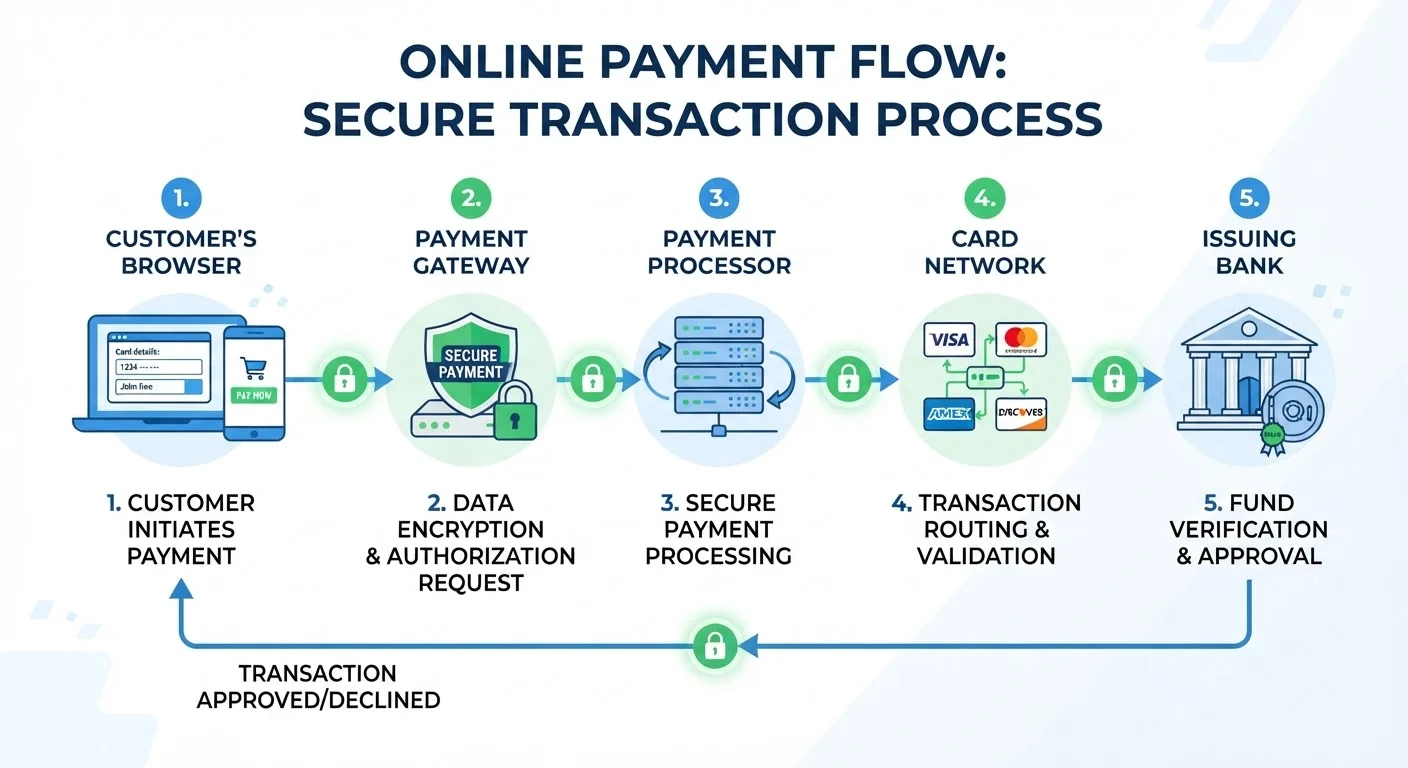
The speed of this process is deceptive - it feels instant, but each step involves active security checks. Understanding these steps helps you spot when something is wrong, like a checkout that routes your data through an unfamiliar domain or asks for information no legitimate processor needs.
Encryption and Tokenization: The Two Pillars You Rely On
Two technologies do the heavy lifting in online payment security. They're often confused, but they solve different problems.
Encryption
Encryption scrambles your card data using a cryptographic key so that only authorized parties with the corresponding decryption key can read it. TLS encryption protects data in transit - as it moves between systems. Think of it as a sealed armored truck. The data inside is protected while moving, but once it arrives and the truck is unlocked, what happens next depends on the recipient's own security practices.
Tokenization
Tokenization solves the "what happens after arrival" problem. Instead of storing your actual card number (called the Primary Account Number, or PAN), the payment system substitutes it with a randomly generated string of characters - the token. This token is what gets stored in the merchant's database, processed for repeat purchases, or transmitted for refunds.
If a hacker breaches the merchant's database, they get a list of tokens. Those tokens are mathematically unrelated to the original card numbers and are only useful within that specific payment system. They cannot be used to make purchases elsewhere.
PCI DSS: The Baseline Every Merchant Must Meet
Any business that accepts card payments must comply with the Payment Card Industry Data Security Standard (PCI DSS). Compliance requirements scale with transaction volume - a small Etsy seller and a major retailer face different audit requirements, but both must meet minimum standards around encryption, access control, and vulnerability management. Non-compliance can result in fines and loss of card-acceptance privileges.
HTTPS Is a Floor, Not a Ceiling
A padlock icon in your browser confirms that data is encrypted in transit between your browser and the server. It does not confirm that the site operator is legitimate, that their backend is secure, or that they comply with PCI standards. Phishing sites routinely use valid HTTPS certificates. Treat HTTPS as a necessary but not sufficient condition for trust.
Tokenization also powers the "saved card" feature on your favorite retailers. When you check out in one click, you're authorizing a transaction against a token - your card number was never re-transmitted.
“Tokenization is one of the most powerful tools we have for reducing the value of stolen data. If merchants never store card numbers, breaches become far less profitable for attackers.”
— Randy Vanderhoof, Executive Director, Secure Technology Alliance
Together, encryption and tokenization create a layered defense: even if one system is compromised, the other limits what an attacker can actually do with the data they obtain.
What Payment Gateways and Processors Actually Do
The terms "payment gateway" and "payment processor" are often used interchangeably, but they're distinct components - and understanding the difference clarifies why merchant-side data breaches are less catastrophic than they used to be.
Payment Gateway
The gateway is the entry point. It accepts your card data from the checkout page, encrypts it, and passes it securely downstream. Modern gateways like Stripe, Square, or PayPal use a technique called hosted fields - the card input boxes on the checkout page are actually served by the gateway's servers, not the merchant's. This means the merchant's site never handles raw card data at all. The merchant gets a token; the gateway handles the sensitive data.
Payment Processor
The processor is the back-end engine that routes authorization requests between the gateway, the card network (Visa/Mastercard), and the issuing bank. It manages the communication protocols, settlement timing, and interchange fee calculations. Processors are subject to strict PCI DSS Level 1 compliance - the highest tier of the standard.
$9.5B
U.S. card fraud losses in 2023
According to the Nilson Report, card fraud losses in the United States reached $9.5 billion in 2023, underscoring why multi-layer security isn't optional.
75%
Card fraud that is card-not-present fraud
The Federal Reserve estimates that card-not-present fraud - the type relevant to online shopping - accounts for roughly 75% of all payment card fraud in the U.S.
1.5 sec
Average bank authorization decision time
Visa reports that its network processes authorization decisions in an average of 1.5 seconds, during which multiple fraud scoring checks are completed.
$0
Liability cap under major issuer zero-liability policies
Visa, Mastercard, American Express, and Discover all offer $0 fraud liability for unauthorized transactions reported promptly on consumer credit cards.
For shoppers, the practical takeaway is this: when a retailer uses a reputable gateway with hosted fields, your exposure is dramatically reduced. The merchant becomes a less attractive target because they don't hold the data that matters. This is why the shift toward integrated, third-party checkout solutions has meaningfully improved the security baseline for everyday online shopping.
If you want to spot a secure checkout, look for recognizable gateway branding (Stripe, PayPal, Adyen) and check whether the card input fields load from a different domain than the merchant's site - a sign that hosted fields are in use. Our companion guide goes deeper on the visual signals: red flags that a payment page isn't as secure as it looks.
How Your Card Issuer Fights Fraud in Real Time
The authorization step - when your issuing bank approves or declines a transaction - isn't just a balance check. It's a real-time fraud scoring exercise that happens in under two seconds.
Issuers run each transaction through behavioral models that consider:
- Transaction velocity: Are multiple charges happening in quick succession?
- Geographic anomalies: Is this purchase in a location inconsistent with your normal patterns?
- Merchant category: Does this type of purchase fit your history?
- Device and IP signals: For card-not-present transactions, is the device recognized?
- Amount patterns: Is the amount consistent with your typical spend at this merchant type?
When something looks off, the issuer may decline the transaction outright, trigger a step-up verification (like sending you a text code), or flag it for review. This is why you sometimes get a fraud alert on a legitimate purchase after traveling or buying something unusual - the model flagged an anomaly.
Tell Your Bank Before You Travel
If you're shopping from an unusual location - a new city, a different country - notify your card issuer before you go. Modern fraud models flag geographic anomalies and may decline legitimate purchases. A quick call or in-app travel notice prevents legitimate transactions from being blocked at exactly the wrong moment.
Use Virtual Cards for Subscriptions
For any subscription service, generate a virtual card number locked to that merchant and set a spending limit that covers only the expected monthly charge. This prevents unexpected price increases from going through and makes cancellation bulletproof - just kill the virtual number. Services like Privacy.com offer this for free.
Enable Transaction Alerts on Every Card
Most issuers let you set push or email alerts for every transaction above a threshold - set it to $0 so every charge notifies you in real time. This is your fastest fraud detection layer, faster than any monthly statement review. If you didn't make the purchase, you'll know within seconds.
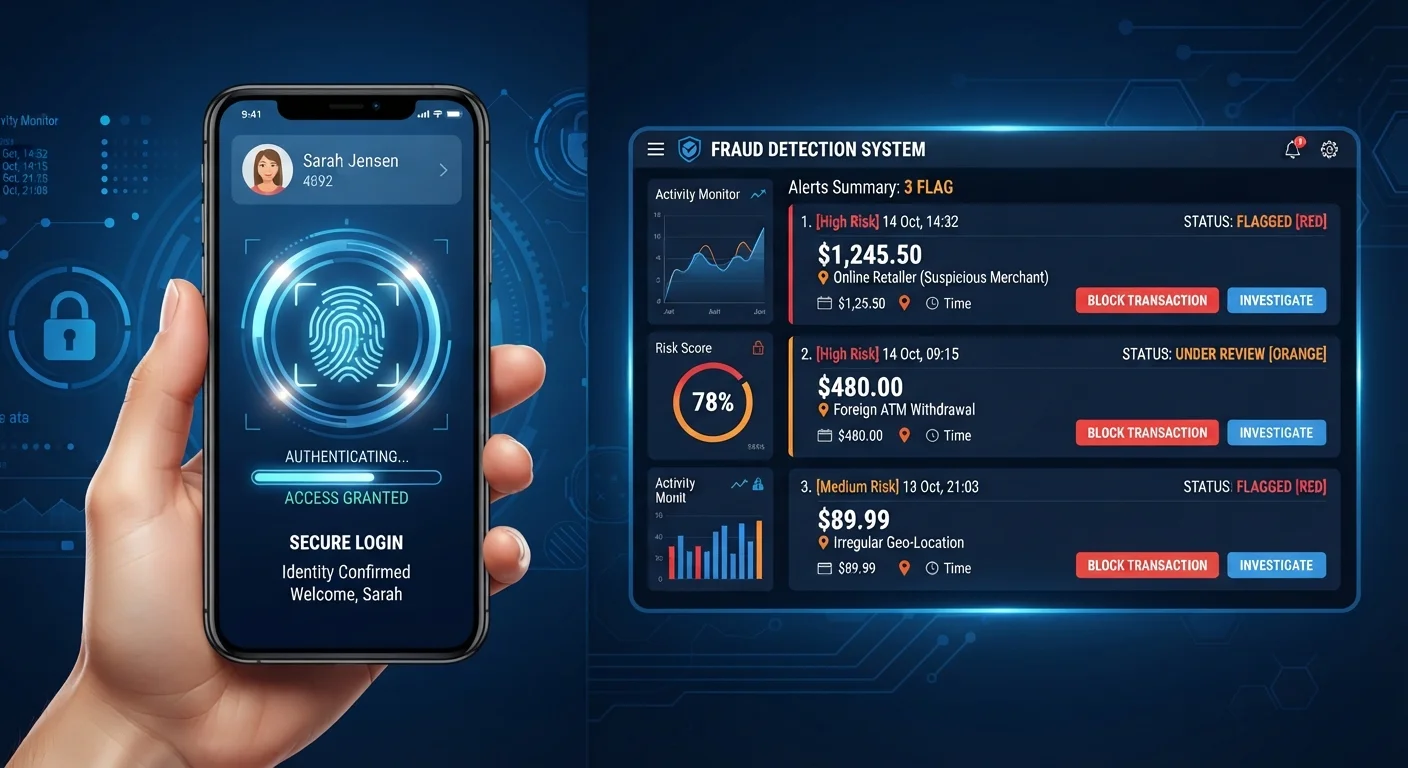
3D Secure (marketed as Verified by Visa or Mastercard Identity Check) adds an explicit authentication step for higher-risk transactions. You're redirected to your bank's verification page and prompted to confirm via a one-time code or biometric. It adds a few seconds of friction but shifts fraud liability away from you toward the issuer and merchant - a meaningful protection when it's triggered.
Digital Wallets and Virtual Cards: Upgrading Your Default Security
If the standard checkout flow already has multiple security layers, why bother with digital wallets or virtual cards? Because they remove your actual card number from the equation entirely - and that's a meaningful upgrade.
Digital Wallets (Apple Pay, Google Pay, Samsung Pay)
When you pay with a digital wallet, your card number is never transmitted. Instead, the wallet uses a device account number - a token specific to your device and card combination - plus a dynamic cryptogram that's unique to each transaction. Even if a merchant's payment system were compromised, there's nothing reusable to steal from your wallet transaction.
Wallets also require authentication (Face ID, fingerprint, or PIN) before each transaction, adding a possession-plus-knowledge factor that raw card numbers don't have.
Virtual Card Numbers
Several card issuers - including Capital One (Eno), Citi (Virtual Account Numbers), and privacy.com - let you generate single-use or merchant-locked card numbers. You give the virtual number to the merchant; your real card number stays off their systems entirely.
This is particularly useful for:
- Free trial signups where you don't want to be auto-charged
- Unfamiliar or smaller merchants with unknown security practices
- Subscription services where you want hard spending caps
Tell Your Bank Before You Travel
If you're shopping from an unusual location - a new city, a different country - notify your card issuer before you go. Modern fraud models flag geographic anomalies and may decline legitimate purchases. A quick call or in-app travel notice prevents legitimate transactions from being blocked at exactly the wrong moment.
Use Virtual Cards for Subscriptions
For any subscription service, generate a virtual card number locked to that merchant and set a spending limit that covers only the expected monthly charge. This prevents unexpected price increases from going through and makes cancellation bulletproof - just kill the virtual number. Services like Privacy.com offer this for free.
Enable Transaction Alerts on Every Card
Most issuers let you set push or email alerts for every transaction above a threshold - set it to $0 so every charge notifies you in real time. This is your fastest fraud detection layer, faster than any monthly statement review. If you didn't make the purchase, you'll know within seconds.
The security gains from these tools cost you nothing. If you're already using a cashback card, pairing it with a digital wallet or virtual number doesn't reduce your rewards - you still earn on the underlying card. Speaking of which, if you're not optimizing what you earn on every purchase, common cashback habits that quietly cost you is worth a read.
Your Liability - and What to Do When Something Goes Wrong
Understanding your legal protections is as important as understanding the technical ones. The U.S. regulatory framework is reasonably consumer-friendly for credit card fraud, less so for debit cards.
Credit Cards
Under the Fair Credit Billing Act (FCBA), your maximum liability for unauthorized credit card charges is $50 - and most major issuers have voluntarily reduced this to $0 through their own zero-liability policies. You have 60 days from the statement date to dispute a charge. If you report before any unauthorized use occurs, your liability is zero regardless.
Debit Cards
The Electronic Fund Transfer Act (EFTA) governs debit cards, and the protections are narrower and time-sensitive:
| Reporting Timeframe | Maximum Liability |
|---|---|
| Within 2 business days | $50 |
| 3-60 days | $500 |
| After 60 days | Potentially unlimited |
This asymmetry is one of the strongest practical arguments for using a credit card - not a debit card - for online purchases. The money in your bank account isn't temporarily frozen while a debit dispute resolves; with a credit card, the disputed amount was never yours to begin with.
What to Do When You Spot Fraud
- Call the number on the back of your card immediately. Don't wait for your statement cycle.
- Request a card replacement with a new number - not just a freeze.
- Review your last 60-90 days of transactions for any other anomalies.
- Change passwords on any accounts that use that card for billing, especially if those accounts reuse passwords.
- Consider placing a fraud alert with one of the three major credit bureaus - it's free and lasts one year.

The technical safeguards described earlier in this article dramatically reduce the odds you'll need these steps. But knowing what to do if the system fails is the final layer of your personal security strategy.
Practical Habits That Make You a Harder Target
Security systems do most of the work, but a few behavioral habits meaningfully reduce your exposure without adding friction to your shopping.
Use credit over debit online
The liability protections are better, the fraud detection is more sophisticated, and disputes are resolved without touching your bank balance.
Default to digital wallets where accepted
Apple Pay and Google Pay are accepted at a growing number of online checkouts. When the option is there, use it - you're handing the merchant a one-time token, not a reusable card number.
Generate virtual numbers for unfamiliar merchants
If your issuer offers virtual card numbers, use them for any site you're not confident about. Merchant-locked virtual numbers are especially effective - even if the number is stolen, it's useless outside that merchant.
Keep a dedicated email for shopping accounts
If a merchant suffers a data breach, they typically have your email address. A separate shopping email limits the blast radius - your primary inbox and connected accounts remain isolated.
Review statements weekly, not monthly
Fraud detection is time-sensitive, especially for debit cards. A quick scan of transactions every few days means you catch anomalies before they compound.
Check for checkout red flags before paying
Not every payment page is what it appears to be. Before entering card details on an unfamiliar site, check the URL, look for recognizable payment gateway branding, and be skeptical of any checkout that requests more information than a transaction requires. Learn the subtler signs of an insecure checkout page before you get burned.
Tell Your Bank Before You Travel
If you're shopping from an unusual location - a new city, a different country - notify your card issuer before you go. Modern fraud models flag geographic anomalies and may decline legitimate purchases. A quick call or in-app travel notice prevents legitimate transactions from being blocked at exactly the wrong moment.
Use Virtual Cards for Subscriptions
For any subscription service, generate a virtual card number locked to that merchant and set a spending limit that covers only the expected monthly charge. This prevents unexpected price increases from going through and makes cancellation bulletproof - just kill the virtual number. Services like Privacy.com offer this for free.
Enable Transaction Alerts on Every Card
Most issuers let you set push or email alerts for every transaction above a threshold - set it to $0 so every charge notifies you in real time. This is your fastest fraud detection layer, faster than any monthly statement review. If you didn't make the purchase, you'll know within seconds.